AI Menu Generator for Restaurants: The Ultimate No-Hype Guide
AI Menu Generator for Restaurants: The Ultimate No-Hype Guide
An ai menu generator is a software tool that automates the digitization of a restaurant's menu. It works by extracting text from a PDF or image, organizing dishes, translating content into multiple languages, and generating food photography using artificial intelligence to instantly create an interactive QR menu.
If you manage a restaurant, bar, or cafe, you are probably exhausted from hearing about artificial intelligence. It seems like overnight, every software company is promising that AI is going to cook for you, serve your tables, and magically multiply your revenue.
Let's come back down to earth. Hospitality is a physical business built on people, sweat in the kitchen, and smiles in the dining room. Artificial intelligence is not going to change that. However, there are administrative tasks that steal hours of your life and money from your cash register, and that is exactly where technology makes sense. One of those tasks is the management, updating, and digitization of your menu.
In this article, we are going to break down honestly, directly, and without commercial exaggeration what exactly an ai menu generator is, how it works on the inside, what you should demand if you decide to hire an ai menu builder for restaurants, and most importantly, what its real limits are so you don't make serious mistakes in your business.
The Problem with Traditional Menus and Static PDFs
To understand why using an ai restaurant menu maker makes sense today, we first need to look at the real problem we are trying to solve. Until recently, when a restaurant owner wanted to change menu prices, add a seasonal dish, or remove an unprofitable dessert, the process was a massive headache.
If you had physical menus, it meant redesigning, sending them to the printer, and absorbing the printing costs. With the rise of QR codes after the pandemic, many restaurants took an intermediate step: uploading a PDF file to the cloud and linking it to a QR code. It seemed like the ideal solution, but a PDF is, essentially, a static digital photo.
If you run out of sea bream in the middle of a busy Friday night service, you cannot enter the PDF from your phone and cross out the sea bream in real-time. You have to go to your computer, open the original file (Word, Canva, InDesign), modify the text, re-export the PDF, upload it to your file manager, and sometimes pray that the QR code link doesn't break. The result in 90% of cases is that the restaurant owner simply doesn't update the file. They just tell the waiters to warn customers that "the sea bream is sold out," causing the first point of friction in the diner's experience.
Furthermore, a PDF is not optimized to be read on a smartphone screen. The customer has to zoom in, scroll from side to side, and if they are a tourist, open an external app to try to translate the ingredients.
This is where the ai menu generator comes into play. It doesn't come to do magic; it comes to eliminate the friction of manual labor.
How Does an AI Restaurant Menu Maker Work Step by Step?
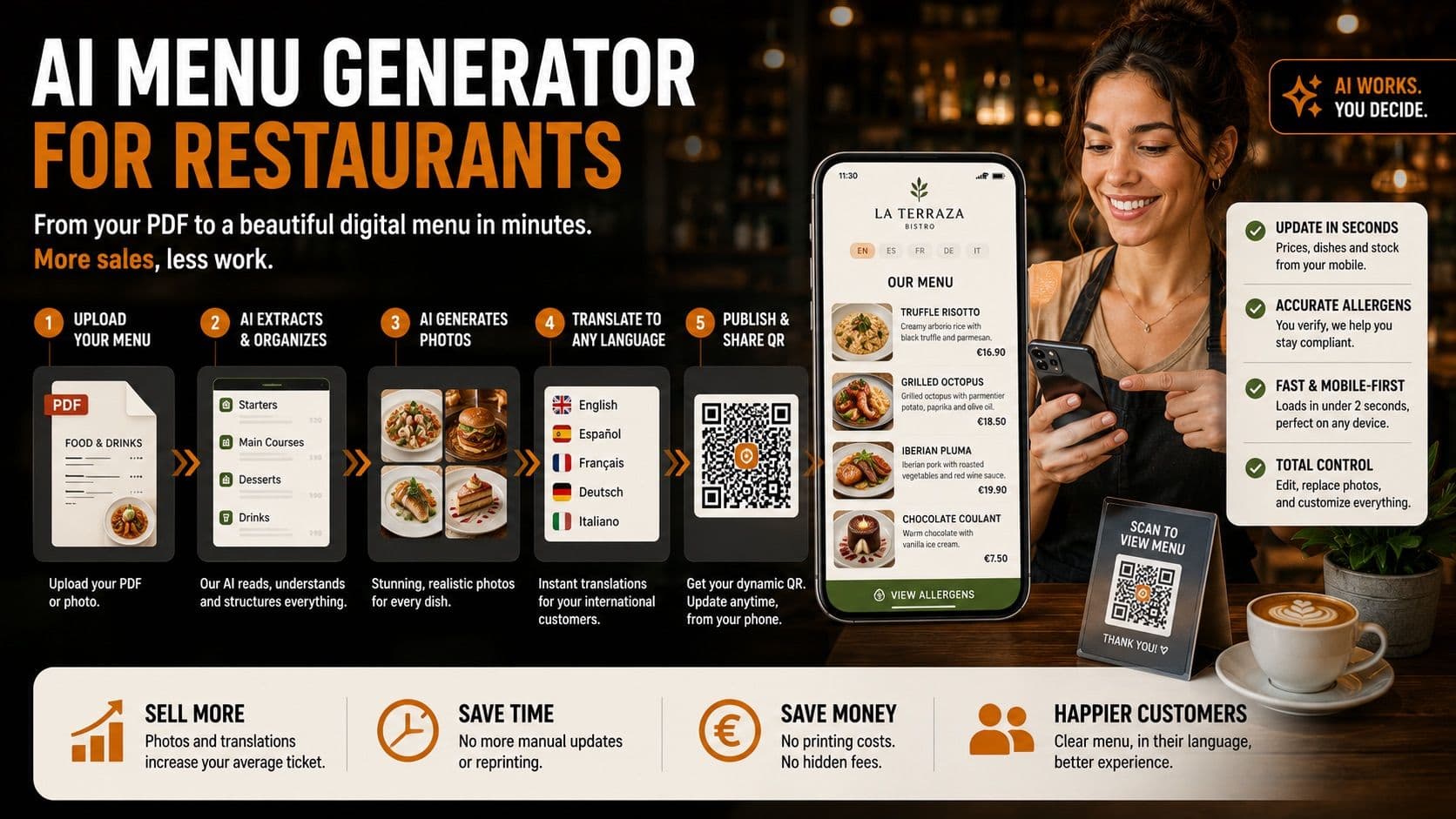
The promise of an AI menu builder is not "click and forget," but rather "click, I'll take away 90% of the boring work, and you just review." The real, useful workflow of these platforms is usually divided into five main steps:
1. Uploading the PDF or Photo of Your Current Menu
The biggest obstacle to digitizing a business is data entry. Nobody wants to spend their Monday morning (their only day off) typing out the 60 dishes on their menu one by one, along with their descriptions, prices, and allergens, into a new platform.
The first step of a good generator is allowing you to upload what you already have. It could be the PDF of your current menu, a Word document, or even a simple photograph you took of your laminated paper menu with your phone's camera.
2. Automatic Extraction and Structuring (The End of Copy-Paste)
Once the file is uploaded, artificial intelligence kicks in using Optical Character Recognition (OCR) technology combined with language models. The AI "reads" your menu and understands the context. It knows how to differentiate what a category is (e.g., "Starters"), what a dish name is (e.g., "Ham Croquettes"), what a description is (e.g., "Portion of 6 homemade acorn-fed Iberian ham croquettes"), and what the price is (e.g., "$12.00").
In a matter of seconds, the system extracts all this information and creates a digital database structure for you. What would have taken you hours of copying and pasting, the system does in a couple of minutes.
3. AI Photo Generation (The Visual Hook)
This is the most striking and at the same time the most delicate point. It is proven in the hospitality industry that a menu with attractive images increases the average ticket size of customers. The problem is that hiring a professional food photographer for the 80 items on your menu costs thousands of dollars.
An ai menu builder for restaurants reads the name and description of your dish and instantly creates a hyper-realistic photograph of it. If it reads "Double cheeseburger with cheddar, crispy bacon, and BBQ sauce," the AI renders an appetizing image that illustrates the dish. Suddenly, your plain text list becomes a spectacular visual catalog that catches the diner's eye.
4. Automatic Translation into Multiple Languages
If you have a restaurant in a tourist area (the coast, the historic center of a large city, monumental areas), you know that the language barrier is a constant source of lost sales. A tourist who doesn't understand the menu well tends to order the most basic and cheapest dishes ("pizza," "burger," "chips") for fear of making a mistake.
AI solves this by generating accurate automatic translations in real-time. And it's not a simple word-for-word translation, but a contextual translation (understanding culinary terms) into multiple languages. Your customer scans the QR, their phone detects their language, and it instantly shows them the menu in their native tongue.
5. Deployment to a Dynamic QR Code
The final step is generating a unique link and a QR code. Unlike the PDF QR code, this is a "dynamic QR." This means that the code printed on the sticker on your table never changes, but you can enter the control panel from your mobile phone, hide a dish, raise the price of a wine, and that change will be reflected the very next second on the phones of all the customers sitting in your venue.
Comparative Table: AI Menu Builder for Restaurants vs. Manual Menu Creation
To clearly see where the return on investment lies (in both time and money), this table summarizes the differences between the traditional method and using an ai menu generator:
| Feature | Manual Creation (PDF / Classic CMS) | AI Menu Generator | | :--- | :--- | :--- | | Initial Setup Time | Hours or days (typing dish by dish). | Minutes (upload PDF and review). | | Dish Photography | Requires a photographer or finding generic stock photos. | Automatic and instant generation based on the dish text. | | Multi-language Translation | Paying translators or using Google Translate manually. | Automatic, contextual, and available in one click for the user. | | Price/Stock Updates | You must edit the original file and re-export it. | Instant from your mobile phone. Hide sold-out dishes with a button. | | Reading Format | Uncomfortable, requires zooming in on the mobile screen. | Responsive design (Mobile-First), optimized for scrolling and tapping. |
What to Look for When Choosing an AI Restaurant Menu Maker
Not all ai restaurant menu maker tools are created equal. The market is starting to fill up with quick apps that promise a lot but fail in real usability for the restaurant owner. If you are considering digitizing your menu with this technology, make sure the platform meets these four fundamental requirements:
- Mobile ease of use for the owner: Your operations center is the dining room or the bar, not an office. If you need a laptop to hide a dish that just sold out, the tool is useless. It must have an interface where you can make changes in 10 seconds from your smartphone.
- Total control over the output: AI should be an assistant, not a dictator. If the tool doesn't allow you to edit text it extracted poorly, or doesn't let you swap an AI photo for a real photo of your own, run away.
- Fast loading optimization: If a customer scans the QR and the menu takes more than 3 seconds to load because it's full of heavy AI photos, the customer will get frustrated. The software must compress and optimize images automatically.
- Ecosystem independence: It's better to look for an agile tool focused solely on the menu, one that doesn't force you to change your current POS (Point of Sale) system or your reservation system.
The Limits of AI (The Honest Section)
As we said at the beginning, we are going to speak without marketing hype. Artificial intelligence is powerful, but it makes mistakes. Assuming that AI is going to do 100% of the work infallibly is the fastest path to a reputation crisis in your restaurant or, even worse, legal problems.
Here are the two golden rules that mark the limits of these tools and that you, as the owner or manager, must never blindly delegate to the machine:
1. AI-generated photos must be reviewed one by one
AI designs photos based on statistical averages of what it considers a "perfect" dish. This can create a serious problem of "overpromising" or false advertising. If your burger is a modest, delicious homemade product, but the AI generates a picture of a colossal tower with cheese melting like a high-budget TV commercial, the customer will feel cheated when the real dish arrives.
Furthermore, sometimes the AI hallucinates: it puts sesame seeds on a bun that doesn't have them, or adds a fork that strangely merges with the edge of the plate. Your responsibility: You must act as the art director of your menu. You have to review each generated photo. If one does not resemble the reality of what comes out of your kitchen, you must regenerate it or, for your signature dishes, use your own real photographs. Visual honesty builds customer loyalty; artificial fantasy generates one-star reviews.
2. Allergens must always be verified by a human
This is non-negotiable. The management of mandatory allergens is a matter of public health and civil liability. A mistake here can trigger an anaphylactic shock in a customer and serious legal problems and fines for your business.
The AI can read the description of your dish and "infer" that if it has cheese, it should mark the "Dairy" allergen. But the AI is not in your kitchen. The AI doesn't know that your cook fries the potatoes in the same fryer where they make the calamari (cross-contamination by mollusks or gluten), nor does it know that the specific brand of BBQ sauce you buy from the supplier contains traces of nuts. Your responsibility: The software provides the interface to mark allergens visually and clearly for the customer, but the supervision, marking, and final validation of which allergens each dish contains must always be done by a human who knows the reality of purchasing and kitchen processes.
Besmeo: Our Honest Proposal
Having laid out the entire landscape of how this technology works and its real risks, it is time to introduce ourselves. Besmeo is a SaaS platform built precisely under this philosophy: using AI to take away the boring work, but always keeping the control in your hands.
In Besmeo, you can upload your current PDF, and we take care of structuring your menu, translating the texts into multiple languages, and generating realistic images so your digital catalog starts selling more from minute one. But our system is designed so that you have the final say. You can change any AI photo to a photo from your gallery with a tap, and we give you the tools to manage your allergens rigorously and simply to comply with health regulations.
If you want to stop fighting with static PDFs and want to see for yourself what your venue's digital menu would look like without commitment, we invite you to try it.
👉 Create your digital menu today at Besmeo.com.
Ready to digitize your restaurant?
Create my menuFrequently Asked Questions (FAQs)
How long does it take to digitize a full menu with an ai menu generator? It depends on the size of your menu, but generally, the automatic process takes less than 5 minutes. Afterward, you should spend between 15 and 30 minutes reviewing that the texts were extracted correctly, adjusting the generated photos, and, most importantly, verifying the allergens for each dish.
Do I need to be an IT expert to use an ai menu builder for restaurants? Not at all. Modern tools are designed for users with no technical background. If you know how to upload a photo to social media or send a WhatsApp message, you have enough skills to upload your PDF and hide or change prices from your mobile phone.
What happens if I don't like the photos the AI makes? A good generator will always give you total control. If the generated image doesn't fit your venue's style or isn't faithful to your plating, you can ask the tool to generate a different one, or directly upload a real photograph taken with your phone's camera.
Does this system work for fine-dining or Michelin Star restaurants? Yes, but with nuances. In a signature or gastronomic restaurant, the visual identity is unique, and the platings are works of art. In these cases, the AI menu generator is used for text extraction, digital organization, automatic translations, and live menu management, but it is highly recommended to disable AI photo generation and exclusively upload professional photographs to maintain brand prestige.
Can I use my old QR code, or do I have to change it? If you already had a QR code printed on your tables that pointed directly to your old PDF, you will generally have to print new ones that point to the unique link generated by the platform. The good news is that the QRs generated by these systems are dynamic, so it will be the last time you ever have to pay a printing company to update your menu.