Are QR Code Menus Worth It for Restaurants? The Real Pros and Cons
Are QR Code Menus Worth It for Restaurants? The Real Pros and Cons
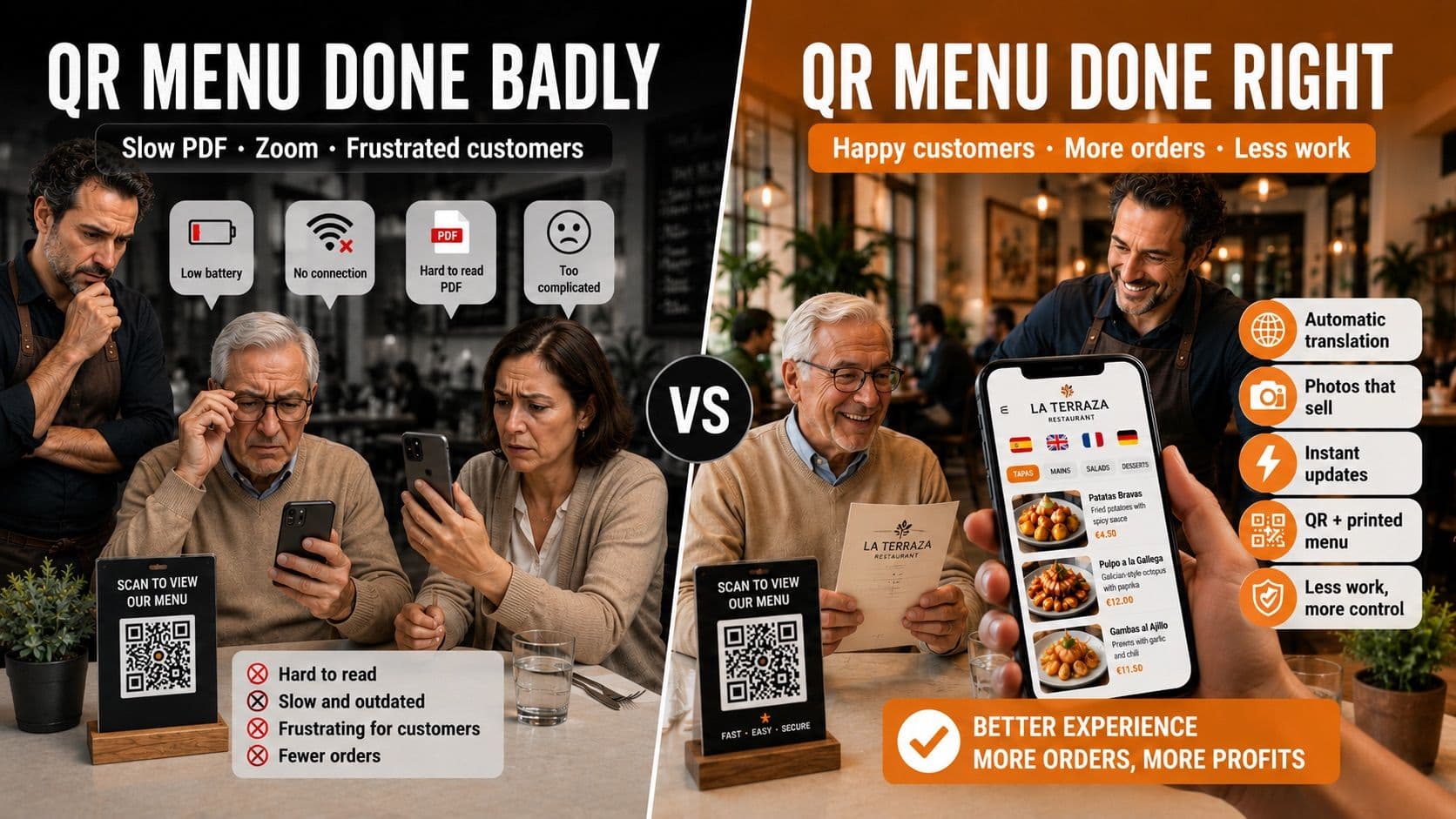
If you've heard that QR menus annoy customers, that they're a leftover from the pandemic, or that people can't be bothered to pull out their phone — you're not entirely wrong. There's truth in all of it. So this isn't a sales brochure of benefits. I'm going to give you the real downsides too, no sugarcoating, and you decide whether a QR menu actually makes sense for your restaurant.
Because the honest answer to "are QR menus worth it?" isn't yes or no. It's it depends on how it's built and what kind of restaurant you run. Let's break it down.
The real downsides of QR menus (I'm not going to hide them)
Let's start with the uncomfortable part, the part almost nobody tells you:
- Some customers don't like them. Especially older guests or people who aren't glued to their phones. Scanning, waiting for it to load, and reading on a small screen can be a hassle compared to a menu they can just hold.
- They depend on the customer's phone. It needs battery, a working camera, and sometimes data or Wi-Fi. If any of that fails, there's no menu.
- A lot of QR menus are bad. The classic QR that opens a PDF you have to pinch and zoom to read the price of a burger is worse than paper. And there are plenty of those out there.
- They can feel less personal. Restaurants are partly about hospitality. Used badly, a QR can make the experience feel colder.
If you stop here, it sounds like they're not worth it. But here's the part that changes the whole calculation.
Want to see what your restaurant's menu would look like with a professional design that actually boosts sales? I promise it won't take more than 5 minutes.
Most of those downsides are the fault of a bad QR, not the QR itself
Notice that almost every complaint above points to the same thing: badly built QR menus. The PDF you can't read, the slow page, the menu that looks cheap. That's not a problem with the concept of a QR menu — it's a problem with a lazy implementation, a leftover from when everyone slapped a QR together overnight in 2020.
A well-built QR menu has almost none of those problems: it loads instantly, it's designed for the phone (no zooming), it reads beautifully, and it can actually be more convenient than paper. So the real question isn't "QR or no QR?" It's "a good QR or a cheap one?"
And there's one more thing that solves the other complaint: you don't have to go QR-only. The smart move is to keep a few paper menus around for whoever prefers them. That way you get the best of both worlds and nobody's left out.
The real benefits (the ones you actually notice)
With a decent QR menu, here's what you genuinely gain:
- Update the menu instantly, no reprinting. Raise a price, hide a sold-out dish, or add today's special from your phone, and it's live for everyone right away. Every change on paper costs money and time; here it's free and takes seconds.
- Tourists understand what they're ordering. If you translate the menu into a few languages, foreign guests are willing to order more instead of playing it safe. In a tourist area, this shows up directly in the check.
- Photos sell. A dish with a good photo gets ordered far more than the same dish in text only. A QR menu lets you have a photo of every dish without printing a giant menu.
- Real savings on printing. No more reprinting every time something changes or a menu gets stained.
- Better hygiene. Guests use their own phone, not a laminated menu everyone has handled.
- A more current image. Done right, it signals that your restaurant is up to date.
Who is it worth it for… and who isn't it?
Let's be honest: it doesn't pay off equally for everyone.
Very much worth it if:
- You're in a tourist area or have international customers (translation makes you money).
- You change your menu or prices often (you save on constant reprinting).
- You have decent turnover and want to raise the average check with photos.
- You want to look like a modern, well-run restaurant.
Less essential if:
- You're a very small spot with a fixed menu that never changes and a loyal, older crowd that prefers paper.
Even in that last case, having a digital version as a backup doesn't hurt. But I'm not going to tell you it's a must-have, because it isn't for everyone.
How to avoid the downsides: what your QR menu needs to actually help
If you decide to do it, make sure it ticks these boxes — this is exactly what separates a good QR from one that annoys people:
- It's built for the phone, reads without zooming, and loads fast.
- You can edit it in real time from your phone, and the QR stays the same after every change.
- It translates the menu into your customers' languages if you get tourists.
- It has photos of the dishes.
- It carries your branding and doesn't look like a generic template.
- And, if you want, you keep a few paper menus around for whoever asks.
Besmeo: a good QR menu, built from your existing menu
The catch with building a good QR menu is the work: typing in every dish, finding photos, translating, designing. Besmeo skips all of that. You upload a PDF or a photo of your current menu and the tool extracts the dishes and prices, generates a photo for every dish, translates the menu into your customers' languages, and hands you a mobile menu with your branding and a QR code ready to print. After that you edit it yourself from your phone whenever you want, and the QR never changes.
In other words: it gives you the "good kind" of QR menu — the one without the downsides above — without you having to build it by hand.
You can try it free with your own menu and see the result before deciding:
👉 Create your QR menu at besmeo.com/create-your-menu
Conclusion
Are QR menus worth it? Yes — if it's well built and your restaurant fits the profile (tourism, frequent changes, turnover). And not so much if you're a small place with a fixed menu and a crowd that prefers paper. What's almost never worth it is a cheap QR that opens an unreadable PDF: that only frustrates the customer.
If you want to see how your menu would look as a good QR menu, upload your PDF at besmeo.com/create-your-menu and check it in minutes.
Frequently asked questions
Do customers find QR menus annoying? They find bad QR menus annoying: slow ones, or ones that open a PDF you have to zoom into. A well-built QR menu, designed for the phone, is usually as convenient as paper or more. Still, it's worth keeping a few physical menus for those who prefer them.
Is a QR menu expensive? It doesn't have to be. There are tools with a free trial, and over time you save what you used to spend reprinting menus.
Do I have to reprint the QR when I change a dish? No, if you use a decent tool. The code stays the same and only the menu content updates.
Does it help if I have foreign customers? That's where it pays off most: with a translated menu, tourists understand what they're ordering and tend to order more.