Best Digital Menu Tools for Restaurants in 2026
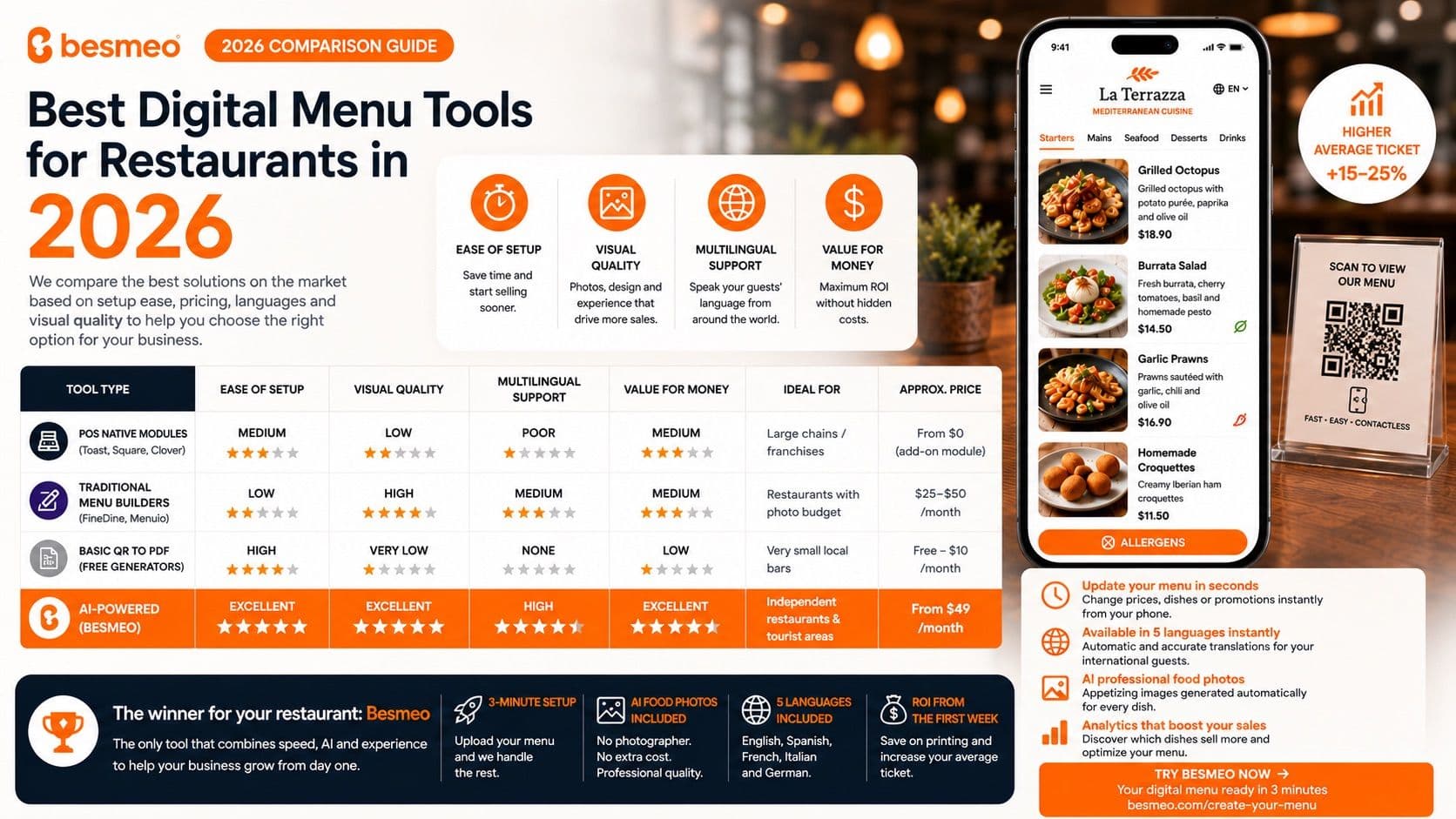
Best Digital Menu Tools for Restaurants in 2026: Which One Is Right for Your Business?
The restaurant industry has moved past the era of static PDFs and clunky QR codes inherited from the pandemic. In 2026, a digital menu is no longer a simple price viewer; it has evolved into an extension of the kitchen and the most powerful marketing tool inside your establishment.
Choosing the right platform can mean the difference between a customer ordering the most basic dish out of habit, or one who gets seduced by a highly visual menu and decides to increase their order value.
In this comparative guide, we analyze the best digital menu tools available this year, evaluating them based on four critical criteria for any restaurant owner: ease of setup, pricing, multilingual support, and visual quality.
The Evaluation Criteria: What Makes a Great Digital Menu in 2026?
Before committing to a platform, a restaurant owner must look at these four pillars:
- Ease of Setup: Time is money. If a tool requires you to manually type in every ingredient and detail for 50+ dishes one by one, you are wasting valuable management hours.
- Visual Quality: We eat with our eyes. A boring text list doesn't sell. The menu must be ultra-visual and optimized flawlessly for mobile screens.
- Multilingual Support: Crucial for establishments in tourist heavy-areas. Translations must be accurate and gastromonically correct, not a generic, literal translation.
- Value for Money: The system should offer a measurable return on investment (ROI) within the first few weeks, without hidden fees for edits or updates.
Analysis of the Top Tools on the Market
1. Native POS Menus (Toast, Square, Clover)
Most major Point of Sale (POS) systems offer their own digital menu extensions via QR code.
- Pros: Complete integration. If you change a price on your POS register or mark a dish as "out of stock" in the kitchen, it updates automatically on the customer's phone.
- Cons: The visual experience is severely lacking. They are often plain, text-heavy, corporate-looking interfaces. Adding photos is a tedious manual process, and robust multi-language support is practically non-existent or requires expensive add-on modules.
- Best For: Large restaurant chains with complex operations where stock synchronization matters more than custom branding or visual appeal.
2. Traditional Digital Menu Editors (FineDine, MenuTiger)
Platforms built exclusively to digitalize menus, offering clean, mobile-first layouts.
- Pros: They provide a much better user experience than a basic POS menu. They allow you to add elegant categories, allergens, and detailed descriptions.
- Cons: The initial setup is completely manual. You have to upload your own photos (which means hiring a professional food photographer if you want it to look good) and type in every single dish. If you have a large menu, this can take days.
- Best For: Independent restaurants that already have a massive library of professional photos and dedicated staff to manage digital data entry.
3. Basic QR-to-PDF Generators
The most rudimentary option, and unfortunately, one that many small businesses still rely on.
- Pros: It is either free or extremely cheap.
- Cons: It ruins the guest experience. Forcing a customer to "pinch-and-zoom" into a PDF on their phone is frustrating, doesn't allow automatic translations, and gives you zero data on which dishes are viewed most. In 2026, keeping this setup means actively losing money.
- Best For: Small local bars with menus that never change and zero international clientele.
Feature Comparison Matrix
| Tool Category | Ease of Setup | Visual Quality | Multilingual Support | Ideal Restaurant Type | | :--- | :--- | :--- | :--- | :--- | | POS Native Modules | Medium (Synced) | Low (Text-heavy) | Poor | Large Chains / Franchises | | Traditional Editors | Low (Manual Entry) | High (If you bring photos) | Medium (Manual Translation) | Restaurants with photo budgets | | Basic QR-to-PDF | High | Very Low (Inconvenient) | None | Very small neighborhood bars | | AI Automation (Besmeo) | Excellent (3 Minutes) | Excellent (AI Food Photos) | High (5 Auto Languages) | Independent & Tourist Areas |
The Undisputed Winner for Independent and Tourist-Area Restaurants: Besmeo
When analyzing the needs of an independent bistro or a venue located in a high-traffic tourist area, Besmeo positions itself as the most efficient and profitable tool of 2026.
It completely eliminates the two biggest headaches of digitalization: setup time and the massive cost of professional photography.
🚀 3-Minute Setup with Zero Data Entry
Unlike traditional editors where you have to type out every single dish, Besmeo operates with a single click: you just upload your existing PDF menu. The platform's AI automatically scans the document, extracts every dish, description, and price, and populates your interactive mobile menu in seconds. Zero design skills required.
📸 Automatic Dishes Photography with Gastronomic AI
The main reason digital menus lack photos is the cost of a photographer ($400 to $1,500 per session). Besmeo solves this by integrating an image generation AI trained specifically on culinary aesthetics. The system reads your dish description and creates an appetizing, hyper-realistic, perfectly lit photo for every single dish automatically.
🗺️ A Magnet for International Tourists
For restaurants welcoming global guests, Besmeo automatically translates your entire menu into 5 key languages the moment it's uploaded. This isn't generic Google Translate copy; the AI understands local culinary terminology and adapts it accurately. A French, English, or German tourist knows exactly what they are ordering, removing friction and boosting your average ticket size.
Conclusion: Which Tool Should You Choose?
If your restaurant is part of a massive franchise with dozens of locations requiring surgical integration with live kitchen inventory, native POS modules are your path.
But if you are an independent restaurant, a local culinary business, or located in a tourist hub, and your goal is to skyrocket sales, captivate guests visually, and have your menu ready in the time it takes to brew a coffee without spending thousands of dollars, AI-driven automation is the only logical choice in 2026.
Want to see what your restaurant looks like with next-gen technology?
[Upload your current PDF menu and generate your interactive digital menu with photos in under 3 minutes with Besmeo