How to create a digital menu for your restaurant (free and in minutes)
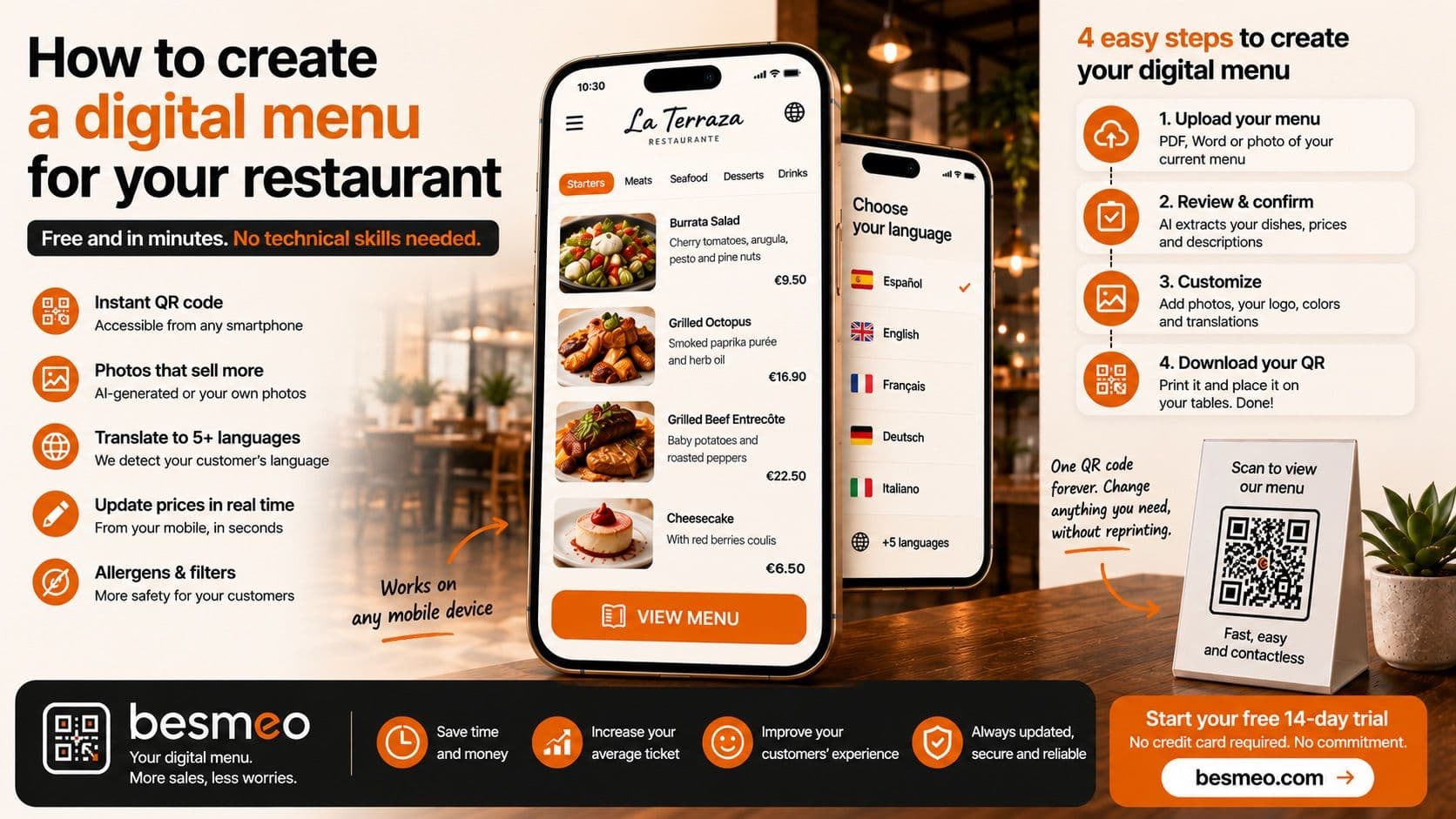
Creating a digital menu for your restaurant involves transforming your physical menu into an interactive web platform accessible via a QR code. This process allows you to update prices instantly, add attractive photos of your dishes, and translate your offering into multiple languages without technical knowledge and without reprinting paper.
If you own a restaurant, we know exactly how you feel when someone brings up "technology," "digitalization," or "software." You are tired. Your day-to-day life is already complex enough dealing with suppliers raising prices, managing staff shifts, balancing the cash register, supervising the kitchen, and making sure every customer leaves happy. The last thing you want is to sit in front of a computer for hours wrestling with a program you don't understand.
Furthermore, it's completely normal for you to be skeptical. The hospitality industry is full of salespeople promising magical solutions that later turn out to be expensive, hard to use, and tie you down with abusive contracts. They tell you it's "free" and then charge you hidden commissions for every dish you sell.
In this guide, we are going to cut to the chase, with total honesty and no fine print. We will explain step-by-step how you can create a professional digital menu for your business. A menu that actually works, helps you sell more, and that you can manage from your mobile phone while having a coffee.
The honest section: Let's talk straight about the word "Free"
You searched online for "how to create a free digital menu" and landed here. Since we promised you honesty from the very first line, we are going to explain what "free" actually means in the real world of restaurant software, and how our model works at Besmeo.
Maintaining secure servers, developing Artificial Intelligence to generate food photography, and providing accurate automatic translations costs money. Any company that tells you they offer a premium digital menu with all features 100% free forever is lying to you. How do they make money then? By selling your customers' data, flooding your menu with external ads, or charging hidden transaction fees.
So, what is free at Besmeo? What is completely free is the creation, the trial, and the initial use. We offer you 14 days completely free so you can upload your menu, see how the Artificial Intelligence extracts your dishes, generates the photos, and translates everything. You will be able to print the QR code, put it on your tables, and see how your customers react. During this period, we do not ask for a credit card, there are no long-term commitments, and there are no tricks.
If after those 14 days you see that your customers love it, that you save time changing prices, and that the menu looks spectacular, you upgrade to a transparent flat monthly fee. No commissions per order. No surprises. If you aren't convinced, you simply stop using it and you haven't lost a single cent. It's that simple and straightforward.
What do you need to get started? (Spoiler: Almost nothing)
Many restaurateurs think that to create a digital menu they need to hire a graphic designer, a professional photographer, and an IT specialist. That might have been true in 2015. Today, technology has advanced precisely to make your life easier.
To create your digital menu today, you only need one thing: Your current menu file. It can be the PDF the print shop sent you the last time you made physical menus. It can be a Word document where you jotted down your dishes and prices. Or, worst-case scenario, it can simply be a well-focused photograph of the physical menu you currently have posted at your restaurant's entrance.
That is enough. You don't need to know anything about databases or web design. The system takes care of reading that document and doing the heavy lifting for you.
The 4 steps to create your digital menu in minutes
Here is the step-by-step guide. You can literally do this during the downtime between lunch and dinner service.
Step 1: Upload your current menu
You log into the platform (from your computer or mobile phone) and click the "Upload Menu" button. You drag and drop your PDF file or select the photo of your menu. At this moment, the Artificial Intelligence kicks in. It starts reading your document, identifying what the categories are (e.g., "Starters", "Meats", "Desserts"), what the dish names are, their descriptions, and their prices.
Step 2: Review and confirm
In a matter of seconds, the platform will show you a draft of your digital menu. You will see a structured list of all your products. This is where you, as the business owner, take control. You simply need to glance over it to confirm the system read everything correctly. Did it price the ribeye at €45 instead of €4.50? Perfect. Did a typo from your original PDF slip through? This is the moment to fix it by simply tapping on the text, just like typing a WhatsApp message.
Step 3: Customize (The magic of photos and languages)
This is where your menu goes from being a boring piece of text to a powerful sales tool.
- Add your logo and colors: Upload your restaurant's logo so the menu breathes your brand identity.
- AI Photography: If you don't have professional photos of your dishes (which cost thousands of euros), Besmeo allows you to generate photorealistic images with Artificial Intelligence based on your dish's description. Your "Goat cheese and caramelized onion burger" will have a photo that makes anyone's mouth water. If you prefer to use your own real photos, you can upload them from your phone's gallery with one click.
- Translations: Click on the languages you want to activate (English, French, German, Italian...). The system will professionally translate your entire menu. No more trying to explain to a foreign tourist what "Salmorejo" is.
Step 4: Print your dynamic QR (and forget about it)
Once the menu looks exactly how you want it, the system automatically generates a QR Code. You can download this code in high-quality format. The huge advantage here is that this is a permanent and dynamic QR. This means you print it today, place it on the tables, by the door, or in the napkin holders, and you will never have to print it again. If next week you raise the price of the daily menu or remove a dessert, you change it on your phone, and the next customer who scans the QR on the table will see the change reflected instantly. The physical code remains exactly the same.
What a good digital menu MUST include
If you are going to make the digital leap, don't settle for half-baked solutions. Customers are increasingly demanding, and your menu is the main sales engine of your business. A professional digital menu must meet these four non-negotiable requirements:
1. Photos that sell (and don't scare)
We eat with our eyes. If your physical menu just says "Caesar Salad - €12", the customer doesn't know if it's a sad little bowl or a spectacular platter with crispy chicken. Photos increase dish sales by up to 30%. A good digital menu should be a visual catalog of your kitchen.
2. Smart and automatic translation
If your restaurant is in a tourist area or occasionally receives foreign visitors, you can't afford to lose sales due to the language barrier. A tourist who doesn't understand the menu won't order the most expensive or elaborate dishes out of fear of making a mistake. They order "pizza" or "burger." A quality digital menu detects the customer's phone language and shows them the menu directly in their native tongue, giving them the confidence to order more, and better, food.
3. Easy, real-time mobile editing
Hospitality is a live, chaotic environment. You run out of turbot in the middle of a busy service. You need to be able to pull your phone out of your apron pocket, open your menu, hit a "Hide dish" button, and have it disappear from every table's QR in one second. If you need to call an IT guy or turn on an office computer to do this, the tool is useless for the day-to-day reality of a restaurant.
4. Clear and safe Allergen Filter
Allergen regulations are strict, and customers with food intolerances suffer a lot when eating out. Your digital menu must allow you to assign allergen icons (gluten, lactose, nuts...) to each dish clearly. Even better, it should allow the customer to filter the entire menu so it only shows them the dishes they can safely eat. This puts the customer at ease and saves your waiters a massive amount of time.
Common mistakes you must avoid at all costs
Many restaurateurs, trying to modernize quickly or looking for the absolute cheapest option, make mistakes that end up ruining their customers' experience. Avoid these at all costs:
The massive mistake: Uploading a static PDF This happened a lot during the pandemic. You'd scan a QR and a heavy PDF would open, taking forever to load. The customer has to "pinch and zoom" with their fingers, scrolling side to side to read the prices, and the phone screen keeps turning off. This is infuriating. Your digital menu must be a mobile-adapted website (responsive), where navigation is done through smooth vertical scrolling.
Forcing an App download Nobody wants to download an app on their phone, register with an email, and create a password just to order some croquettes and a beer at your bar. The QR code must open the menu directly in the customer's mobile browser (Safari or Chrome) instantly. Zero barriers.
Not updating your prices Having a digital menu and not using its main advantage is throwing money away. If you raise prices in your POS (Point of Sale) system because your costs have gone up, but you forget to update them on the digital menu, you are guaranteed to have arguments with customers when it's time to pay. The customer is always right if the published price was lower. Make it a habit to treat the digital menu as your single source of truth.
Dark designs or tiny text Not all your customers are 20 years old with perfect vision. Your menu should have a light background, large text, high contrast, and be easy to read even if the customer is sitting on a sunny terrace with glare on their phone screen.
Besmeo: Your tech ally to make the leap without stress
We perfectly understand your fears and needs because we designed Besmeo by listening to restaurant owners just like you. We wanted to create a tool that didn't require an instruction manual.
With Besmeo, you go from paper to digital in just three minutes. You upload your PDF, our AI does the boring work of extracting text and prices, generates spectacular photos if you need them, and gives you a permanent QR ready to print.
Everything is designed so you can be independent. You can change a price on a busy Saturday night in 5 seconds from your mobile phone. You can welcome customers from anywhere in the world knowing your menu will speak to them in their language. And most importantly: you will convey an image of professionalism, modernity, and cleanliness that justifies your prices and builds customer loyalty.
Ready to digitize your restaurant?
Create my menuFrequently Asked Questions (FAQs) about digital menus
Do I need to be a computer expert to use this? Not at all. If you know how to upload a photo to Facebook or send a WhatsApp message, you know how to use Besmeo. The interface is designed to be as intuitive as using your mobile phone in your daily life.
What happens if my menu changes every day or I have a "Daily Menu"? That is precisely the biggest advantage. You can create a section called "Daily Menu" in your digital menu and update the dishes every morning in less than a minute. Your customers will see the updated menu when they scan the same QR code as always, without you having to print daily sheets or write on a chalkboard.
Do I absolutely have to buy special stickers or acrylic stands? We provide you with the high-quality QR code file. You can print it yourself on office paper and laminate it, send it to a local print shop to make vinyl stickers, or buy typical acrylic table tents and slide the printed paper inside. You decide how much you want to invest in the physical displays.
Do customers have to pay through their phones or can I keep charging normally? You can continue operating exactly as you always have. The digital menu is your catalog, your storefront. The customer looks at it, decides, and when the waiter comes over, they order verbally. At the end of the meal, you charge them at the register or with the payment terminal at the table, just like always. (Although if you ever want to add mobile ordering or payments in the future, the technology supports it, but you are always in control of how you want to work).
What happens if the internet goes down in my restaurant? For the customer to view the digital menu, they need an internet connection on their phone (either their own 4G/5G data or your venue's WiFi). If you have very poor cellular coverage inside your restaurant, it's always recommended to keep a couple of printed physical menus behind the bar for emergencies. Digitalization helps 95% of your customers, but hospitality should always have a Plan B.
The hospitality world is tough enough without continuing to waste time and money at the print shop every time the price of cooking oil goes up. Take the leap today, risk-free and stress-free.
Ready to modernize your restaurant and get more eyes on your dishes?
👉 [Start your 14-day free trial on Besmeo today. Upload your menu PDF and see the magic in minutes, no credit card required. → besmeo.com]