How to update restaurant menu prices fast
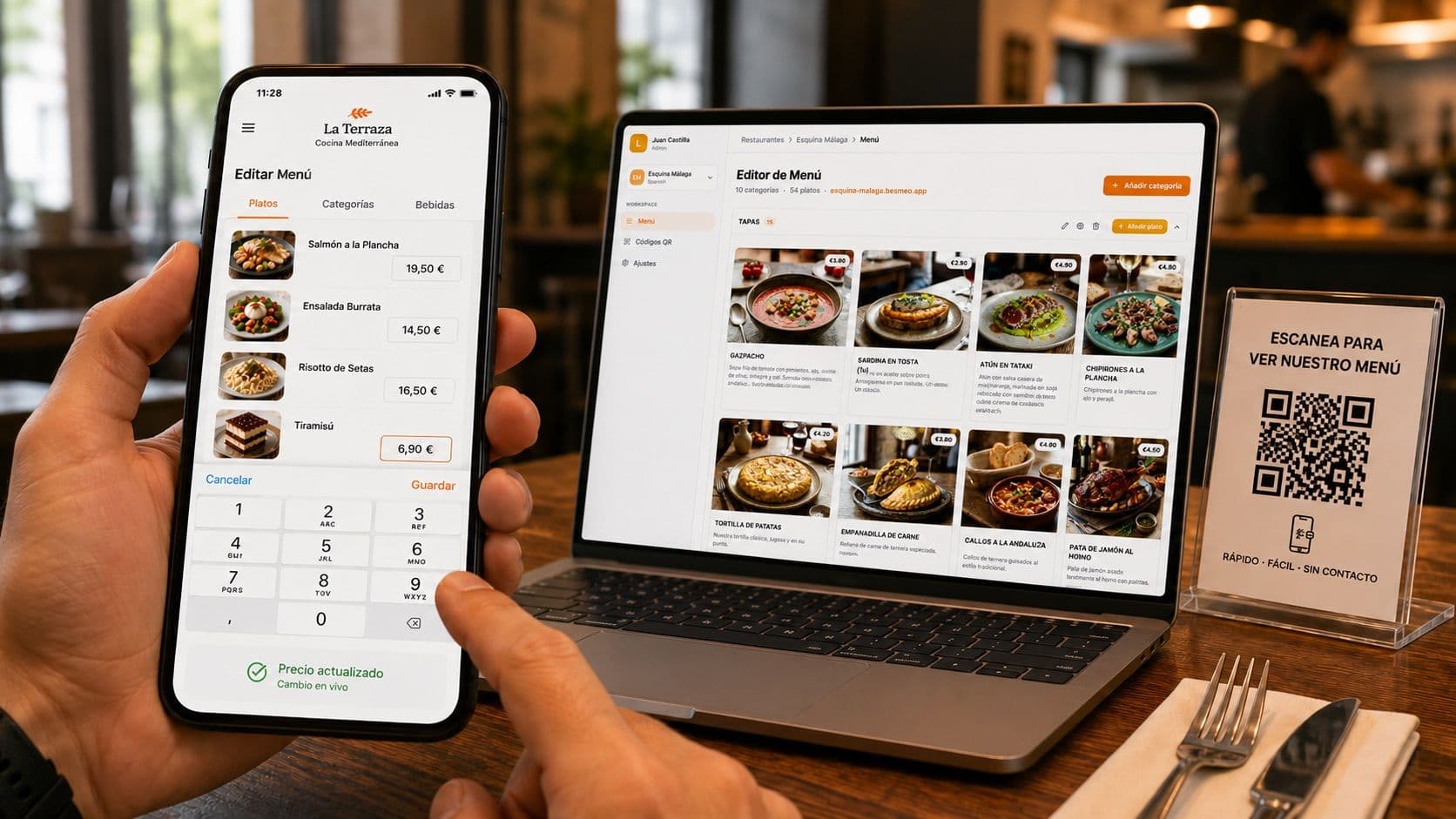
How to Update Restaurant Menu Prices Fast Without Reprinting
Your supplier just raised the price of chicken by 12%. Your chicken dish is now eating into your margin. You know you need to update the price, but the thought of dealing with menu reprints stops you in your tracks.
So you wait. You absorb the loss. Three weeks later, you finally raise the price - but only because you happen to have a scheduled menu redesign coming up.
This is the silent profit leak in most restaurants. Not the prices themselves, but the friction between "I should update this" and "the new price is live." The longer that gap, the more money you lose.
This guide covers the fastest realistic methods to update menu prices, including the modern approach that lets you change any price from your phone in 10 seconds — without reprinting anything, ever.
Why slow price updates cost you more than you think
Let's run the math before getting into solutions.
Say your supplier raises the cost of beef by $1 per dish. You sell 20 burgers per day. That's $20 of margin you're losing every day until you update the price.
If you wait three weeks for a menu reprint, that's $420 in lost margin. The reprint itself costs $200–$400. So your decision to "save money" by waiting actually costs you more than the reprint would have.
Multiply this across every ingredient cost spike, every seasonal swing, every supplier change in a year, and the number gets serious. Most restaurants are leaking $3,000–$10,000 annually in margin they could capture by updating prices faster.
The cost of slow price updates isn't the cost of reprinting. It's the cost of operating with prices that don't reflect your actual costs.
The slow methods (and why they don't work in 2026)
Before talking about the fast methods, let's name the slow ones so you can identify what you're doing now:
Printing inserts. You print a separate paper with the new prices and clip it inside your existing menu. Cheap and quick, but looks unprofessional and customers often miss them.
Crossing out and writing new prices by hand. Effective in the moment but signals to customers that the restaurant doesn't care about the dining experience. Acceptable at a roadside diner, not at a $40-per-plate restaurant.
Full menu reprint. Professional and clean, but expensive ($200–$800 per round) and slow (1–3 weeks between submitting the file and getting the printed menus delivered).
Online ordering platforms only. Some restaurants update prices on UberEats and DoorDash but leave the in-house menu outdated. This creates inconsistency and customer complaints when the website price doesn't match the table price.
Print-on-demand services. A small step up — you order menus as needed instead of in bulk. Faster than traditional printing but still expensive and still requires design work for every change.
None of these are wrong. They're just slow. In a year of small, frequent ingredient cost changes, they cost you real money.
The fast methods
Method 1: A digital menu with mobile-first editing
This is the standard modern approach. You move your menu from paper (or a static PDF) to a proper digital menu platform that supports real-time editing from a phone.
The workflow:
- Your menu lives on a digital platform with a permanent QR code on each table
- When you need to change a price, you open the platform's dashboard on your phone
- Find the dish, tap the price field, enter the new number, save
- The change is live for every customer who scans the QR code from that moment on
Total time: 10–30 seconds per change.
The advantages compound quickly. You can update prices between lunch and dinner service. You can react to a supplier price hike the same day it happens. You can run a Friday night special, add it at 4 PM, remove it Sunday morning, and never have to print anything.
This is the operational level most restaurants don't realize is possible. Once you have it, going back to printed menus feels primitive.
Method 2: A POS-integrated digital menu
If you have a modern POS system (Toast, Square, Clover), some of them include digital menu features that sync with your POS prices. Update the price in the POS, it updates everywhere.
The advantage is that your in-house menu prices, online ordering prices, and POS prices all stay in sync automatically. No risk of charging one price at the counter and showing another on the menu.
The disadvantage is that POS-integrated menus tend to be basic - usually just lists of items and prices, without rich photos, multilingual support, or the design flexibility that customers expect from a quality restaurant. They're functional but not impressive.
For high-volume operations where consistency across channels matters more than menu design, this can be the right answer. For most independent restaurants, a dedicated digital menu platform offers more flexibility.
Method 3: A free no-code digital menu
You can build a basic digital menu with tools like Carrd, Wix, or even a Google Site, point a QR code to it, and update prices by editing the page.
The advantage: it's free or nearly free.
The disadvantage: you're now responsible for the design, the mobile optimization, the photo hosting, the translations (if any), and the ongoing maintenance. What feels free in setup costs hours of your time every time you need to make a change.
For very small operations with simple menus that rarely change, this can work. For most restaurants, the time cost makes "free" a bad deal.
What a fast price update actually looks like in practice
Let's walk through a real scenario with a modern digital menu platform like Besmeo:
It's Wednesday afternoon. Your produce supplier just informed you that avocado prices have jumped 30%. Your avocado toast, your guacamole, and your chipotle bowl all use avocado.
Old workflow: Note it down. Mention it to the designer next time you do a menu update. Lose money in the meantime. Eventually update the prices in 2–3 weeks.
New workflow:
- Open the menu dashboard on your phone (10 seconds)
- Tap "Avocado Toast" → tap the price → change from $14 to $16 → save (15 seconds)
- Tap "Guacamole" → change from $9 to $11 → save (10 seconds)
- Tap "Chipotle Bowl" → change from $18 to $20 → save (10 seconds)
Total time: 45 seconds. The new prices are live before you finish your coffee.
The QR codes on the tables haven't changed. The customers who scan them this evening see the new prices automatically. You didn't reprint anything, didn't call anyone, didn't lose margin on a single plate served after 3 PM.
This is what fast looks like. Anything slower than this is leaving money on the table.
Beyond price updates: what else fast editing unlocks
Once you have the ability to edit your menu in real time, other operational improvements become possible:
Marking dishes unavailable instantly. Sold out of the salmon at 7 PM? Hide it. Servers stop pitching it. Customers stop ordering it. By morning prep, you bring it back with one tap.
Adding daily or weekend specials. No more chalkboard specials your servers have to memorize. Add the special to the menu Friday afternoon, remove it Sunday night. Customers see it. Servers see it on their training screens. Everyone is in sync.
Reacting to events. Big game day? Add the wings special two hours before kickoff. Local festival? Add a themed menu for the weekend. The menu adapts to opportunities instead of being a fixed asset.
Testing seasonal items. Want to try a new dish? Add it for two weeks. Watch the analytics to see if it's getting viewed and ordered. If it works, keep it. If it doesn't, remove it without ever having to remove it from a printed menu.
Bilingual or multilingual updates. Change a dish in one language, and the system handles the rest automatically. No more updating English prices and forgetting the Spanish version.
These benefits aren't features you use occasionally. They're operational capabilities that compound across the year. Restaurants that have this flexibility consistently outperform restaurants that operate with frozen menus.
What to look for in a fast-editing platform
Not every digital menu platform delivers this speed. If you're evaluating options, check for these specific capabilities:
Mobile-first dashboard. You should be able to make every change from your phone. If the platform requires a laptop to edit anything beyond basic settings, it's not designed for fast updates.
One-tap publish. Some platforms have a draft mode that requires you to publish changes separately. That's a friction point. The best platforms make every save instantly live.
Permanent QR code. Critical. The QR code on your tables should never change, regardless of how many times you update the menu inside. If you ever have to reprint QR codes when changing the menu, the platform is built wrong.
Item-level control. You should be able to hide a single dish without affecting anything else, change one price without touching others, and toggle availability without doing a full menu edit.
Multi-language sync. If you support multiple languages, a price change in one should update across all languages automatically. Manual translation maintenance defeats the purpose of fast editing.
Audit trail (optional but valuable). Some platforms show you a history of who changed what and when. Useful for restaurants with multiple managers, less critical for solo owners.
Making the switch from paper or PDF
If you're still on paper menus or PDF-via-QR-code, the transition is simpler than most owners expect. Modern digital menu platforms accept your existing menu in any format — PDF, photo of your physical menu, or even an Excel spreadsheet — and convert it automatically.
You upload your current menu. The platform extracts every dish, description, and price. You review and approve. The menu goes live with a QR code you can print and stick to your tables. The whole process takes about 3 minutes.
After that, every price change happens from your phone. No designer, no printer, no waiting.
The bottom line
Fast price updates aren't a nice-to-have. They're the difference between protecting your margin during cost spikes and absorbing the losses for weeks at a time. They're the difference between agile pricing and frozen pricing.
The technology to do this exists, it's affordable, and it takes less time to set up than your last menu redesign took to print. The question isn't whether to switch to a fast-editing menu platform. It's how much margin you're willing to keep losing before you do.
Upload your menu and start updating prices in seconds →