PDF Menu to QR Code: Create a Smart Digital Menu in 3 Minutes
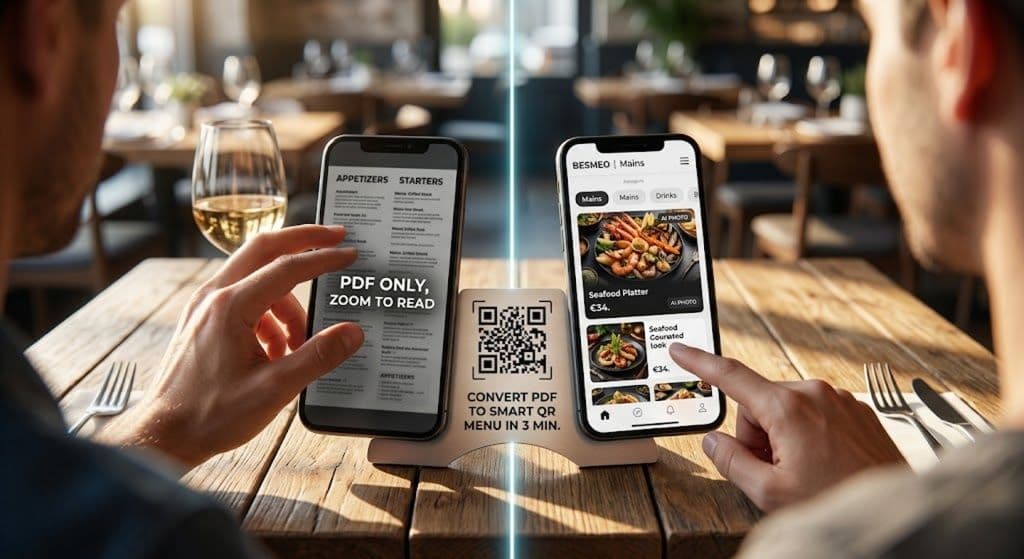
PDF Menu to QR Code: Create a Smart Digital Menu in 3 Minutes
You already know you need a QR code on your tables. But if your customers scan that code and end up looking at a static, hard-to-read PDF file, you are quietly losing money every single service.
Customers hate pinching and zooming to read tiny text. They hate waiting for heavy files to load. And if they can't clearly see what you offer, they default to ordering the cheapest, safest item on the menu.
You don't just need a PDF menu to QR code converter. You need a tool that transforms your flat document into an interactive, high-converting digital dining experience.
Here is how you can do it in under 3 minutes—without typing a single dish manually.
Why "Dumb" PDF Menus Hurt Your Business
Most free QR code generators do one simple thing: they take your PDF file and host it online. We call this a "dumb" digital menu.
Here is why it’s costing you money:
- Terrible Mobile Experience: PDFs are designed for A4 paper, not 6-inch smartphone screens.
- No Visual Appetite Appeal: Unless you paid a professional photographer thousands of dollars, your PDF probably lacks photos. People order with their eyes; no photos means smaller average checks.
- Language Barriers: A tourist scanning an English PDF menu won't understand your signature dishes, slowing down your waiters and frustrating the guest.
- Hard to Update: 86'd a dish? Raised a price? With a PDF, you have to edit the original design file, export it again, and re-upload it.
The Solution: Turn Your PDF into a "Smart" Digital Menu
With Besmeo, you don't just host a PDF. Our AI reads your PDF and automatically builds a stunning, mobile-first website for your restaurant.
Here is what happens when you upload your PDF menu to Besmeo:
1. Instant AI Extraction (No Typing Required)
Forget about spending hours copying and pasting dish names, descriptions, and prices. Just upload your current PDF. Our AI instantly extracts all your categories and items and organizes them perfectly for mobile viewing.
2. Auto-Generated Food Photography
Menus with high-quality photos see up to a 30% increase in order value. If your PDF doesn't have photos, don't worry. Besmeo’s AI generates incredibly realistic, mouth-watering images for your dishes automatically. You get a premium-looking menu without hiring a photographer.
3. Automatic Translation for Tourists
If your restaurant is in a tourist hotspot, this is a game-changer. When a customer scans your Besmeo QR code, the menu detects their phone's native language and translates your entire menu instantly. No more confused tourists pointing at random items.
4. Real-Time Updates from Your Phone
Sold out of the daily special? Change it in 10 seconds right from your smartphone. Your printed QR code never changes, but your digital menu is always up to date.
How to Convert Your PDF Menu in 3 Simple Steps
Ready to ditch the pinch-and-zoom? Here is how to upgrade your restaurant today:
- Upload your PDF: Create a free Besmeo account and upload your current menu (PDF, Word, or even a clear photo of your paper menu).
- Let AI do the heavy lifting: Wait 60 seconds while our AI structures your categories, assigns prices, and generates food photos.
- Download your QR Code: Print your custom, never-changing QR code. Place it on your tables and watch your average check grow.
Stop Leaving Money on the Table
Your food is excellent, and your service is great. Your menu should match that standard. Upgrading from a clunky PDF to a smart, photo-rich digital menu is the easiest ROI you will see this year.
Upload your PDF and start your 14-day free trial today