What is a QR menu, and how does it work?
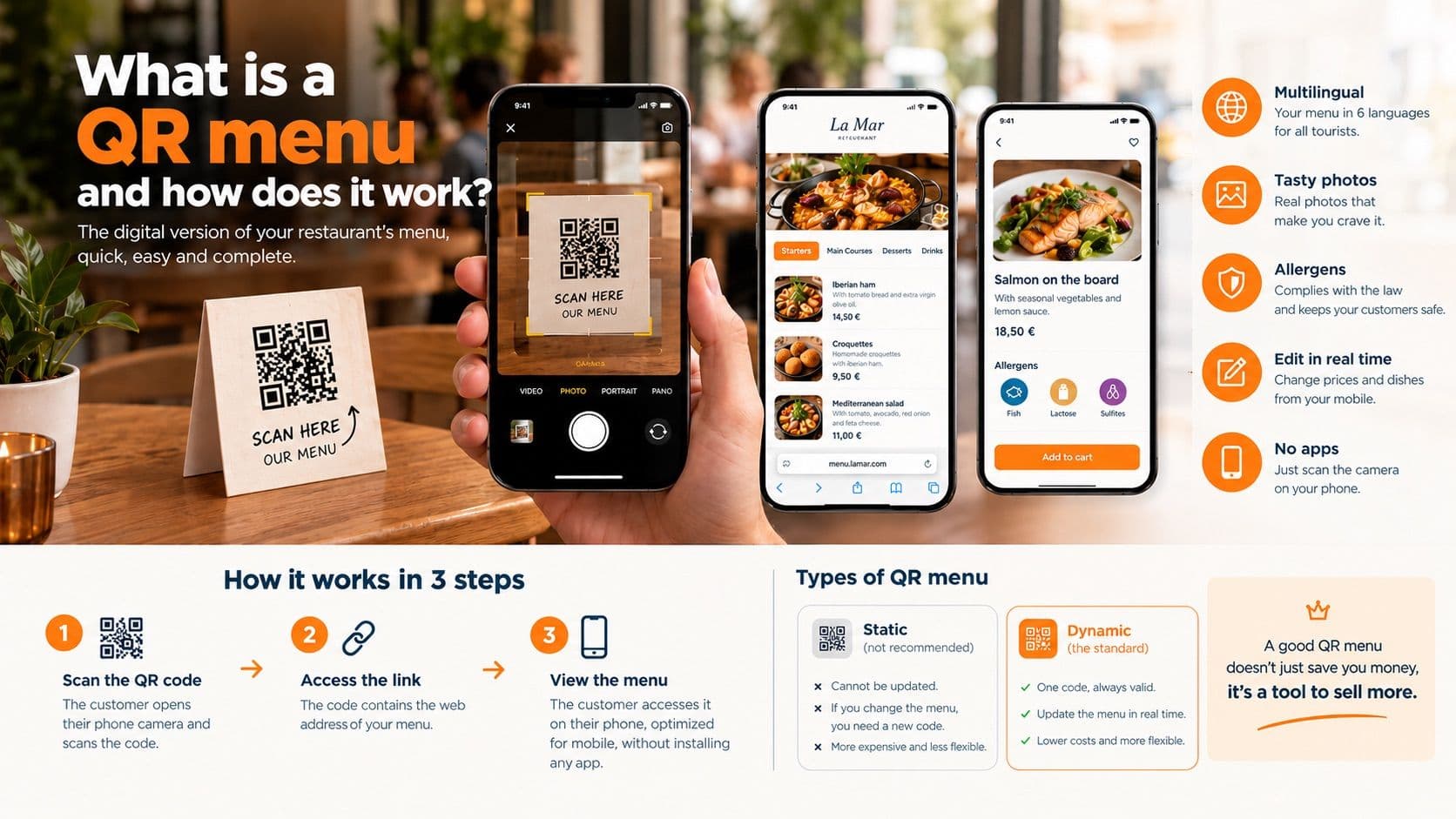
What is a QR menu and how does it work? (Complete definition)
A QR menu is the digital version of a restaurant's physical menu, accessible by scanning a two-dimensional code with a smartphone camera. It works by linking the customer directly to an optimized web platform where they can view dishes, prices, photographs, and allergens in real-time, without installing any applications.
Digitalization has entered the hospitality industry with a bang, and the element that has transformed the most is, without a doubt, the menu. If you own a restaurant, bar, or cafe, you've likely already faced the insistence that you need a "QR menu". But, with so much technical information (and misinformation) out there, it's normal to feel resistance or confusion towards this concept.
If you feel overwhelmed by the options, if you are frustrated by depending on designers every time the price of an ingredient goes up, or if you simply want to understand which technology is useful and which is a gimmick, you are in the right place. In this article, we are going to debunk the myths and explain clearly, directly, and without technical jargon exactly what a QR code menu is, how it works under the hood, and why not all QR systems are created equal.
What a QR menu is NOT (The PDF myth)
Let's start by clarifying the most widespread misconception in modern hospitality. Many software companies, taking advantage of the urgency during the pandemic, sold a flawed idea of digitalization.
A professional QR menu is NOT simply your paper menu scanned into a PDF format.
If the code you have on your terrace tables forces the customer to download a heavy file, to pinch and zoom on the screen just to read the small print, and to scroll wildly to guess the price of dessert, you don't have a digital menu. You have a usability problem.
Putting a PDF behind a QR code is the equivalent of putting a photo of your storefront on the internet and calling it a "website". It is static, it is uncomfortable for the user (whose phone screen usually turns off while reading), and, above all, it is impossible to update quickly without creating a brand new document. A true QR code menu must be an interactive experience designed from scratch to be read on a vertical mobile phone screen.
How does a QR menu work? (Explained for non-techies)
The technology behind the QR menu, although it may seem complex, is based on a very simple principle. You do not need to know programming to understand and master it. Let's break it down into three very clear phases:
1. The code (The gateway)
The "QR" (Quick Response) is nothing more than a checkered drawing that acts as a shortcut. Instead of forcing the customer to open their browser and type a long and complicated web address like www.myrestaurant.com/summer-menu-2026, the QR code contains that hidden address.
2. The scan (The customer interaction)
Today, 99% of smartphones (whether iPhone or Android) have a built-in QR reader directly in their normal camera application. The customer arrives at the table, opens their phone camera, focuses on the printed square, and the phone automatically recognizes the link, showing a prompt to open the web page. There is no need to download any external application.
3. The web platform (The destination)
This is where the magic happens. By tapping the link, the customer's phone opens the standard browser (like Safari or Google Chrome) and loads your digital menu. If the system is good, this menu will be presented as a fluid list, with large text, organized by categories (Starters, Meats, Wines) and, above all, perfectly adapted to the size and brightness of their mobile phone screen.
Types of QR menus: Static vs. Dynamic
Not all QR codes are made the same. When choosing a technological solution for your business, this is the most critical decision you must make so you don't waste money at the print shop.
The Static QR code
It is the most basic format. When you create a static QR, you are permanently and unalterably burning the web address or PDF file into the little square drawing.
- The problem: If tomorrow you change suppliers and your menu's web address changes, or if you remake your menu PDF and a new link is generated, the static QR code drawing is no longer useful. You will have to throw it in the trash, redesign your acrylic stands, print new codes, and stick them on all the tables.
The Dynamic QR code (The professional standard)
This is the technology used by modern platforms. The dynamic QR does not link directly to your final menu, but functions as a smart "plug" in the cloud that you control.
- The advantage: You print the QR code once and put it on your tables. That physical drawing never changes. However, from the control panel on your computer or mobile, you can tell that same code where it should point today. You can change the entire menu, raise prices due to inflation, or modify the entire gastronomic offering, and the customer who scans the same physical code as always will see the new version instantly.
What must a good QR code menu have?
For a digital menu not to be a nuisance, but a real tool that helps you sell more and makes your waiters' jobs easier, it must meet these fundamental requirements:
- Mouth-watering photographs: Hospitality is visual. A name on a piece of paper doesn't sell as much as a photorealistic image. Advanced systems allow you to integrate attractive images so the customer knows exactly what they are ordering.
- Automatic translation: If you are in a tourist area, losing sales because a foreigner doesn't understand what "migas" or "salmorejo" is is a serious mistake. The menu must detect the customer's phone language and translate itself instantly (English, German, French, etc.).
- Independence and mobile editing: A good system must allow the restaurant owner to hide a sold-out dish or change the price of a wine in real-time, from their own mobile phone, without having to call IT guys or designers.
- Clear allergen management: The law is strict. The menu must unequivocally show the icons of the 14 allergens on each dish to prevent poisoning and shield the venue's legal liability.
Honest pros and cons of the digital menu
Like any tool in a business, digitalizing the menu has incredible benefits, but also some limitations that an experienced manager must know.
Pros (Main advantages)
- Radical savings on printing: Eliminate forever the recurring expense of designing, laminating, and reprinting dozens of physical menus every time you change a dish or a price.
- Increased average ticket: By seeing attractive photographs of the products and reading the descriptions in their native language, the customer orders with more confidence and tends to consume higher-value dishes or add extras like desserts.
- Hygiene and maintenance: No more sticky physical menus, stained with oil or worn out from being passed from hand to hand through the dining room.
Cons (Real limitations)
- Network dependency: If your restaurant is in a deep basement or in a mountain area without cellular coverage, and you do not offer WiFi to your customers, they will not be able to load the menu.
- The elderly barrier: Some very older customers or those with little technological affinity may feel frustration or rejection when trying to use their phone camera to order food.
Pro tip: The QR menu solves 95% of modern operations, but hospitality is about hospitality. It is always advisable to keep a couple of traditional physical menus behind the bar for those customers who do not have battery on their phone or who do not know how to use the technology.
Ready to digitize your restaurant?
Create my menuFrequently Asked Questions (FAQs) about QR menus
Do I need to buy any special device to read the QR? No. Neither you nor your customers need additional hardware. Any mobile phone manufactured in recent years reads the codes directly by opening the normal camera app, without installing anything extra.
If I raise the prices, do I have to change the stickers on the tables? No, if you use a platform with dynamic QR codes. The code on the table remains the same; you only update the price in your control panel and the change is reflected on the customers' phones instantly.
Is it safe to scan QR codes in a restaurant? Yes. The QR codes generated by professional hospitality platforms point solely to secure web servers that display the food catalog. They do not run programs or steal data from the phone.
How long does it take to make a QR menu from scratch? In the past, it could take weeks of web design. Today, with automated platforms, you can have your menu ready and operational in your dining room in less than 10 minutes.
Can I use my QR to receive delivery orders? It depends on the platform you hire. The most advanced ones allow you to activate a module where the QR code not only shows the menu but functions as an ordering gateway (delivery or pickup) managing payments via Bizum or credit card.
Does the QR menu replace the waiter? Absolutely not. The digital menu is your best visual storefront. It speeds up the moment when the customer decides what they want to eat, but human contact, advice (upselling), and quality of service in the dining room still depend on your staff.
Take the definitive step without depending on IT guys
Understanding how a QR menu works is the first step to not being fooled by half-baked solutions. You know your business needs agility: to be able to change prices without middlemen, not to lose money at print shops every season, and to give confidence to tourists with correct translations.
At Besmeo, we have designed technology specifically for the restaurateur who wants absolute control without having to wrestle with complex computer programs. We do the heavy lifting: you just upload your current menu in PDF or photo, and our Artificial Intelligence extracts your dishes, generates mouth-watering photos, and translates everything into multiple languages. You retain the authority to review, edit prices instantly from your mobile, and manage your business with a dynamic QR that never expires.
Ready to have a digital menu that works for you and not the other way around?
👉 [Create your free account at besmeo.com, upload your menu PDF and see in 3 minutes how your menu is transformed.]